

Reading the output#
A simulation writes a folder full of data files. DataFile loads one of them,
whatever its format, and hands you its contents as named arrays.
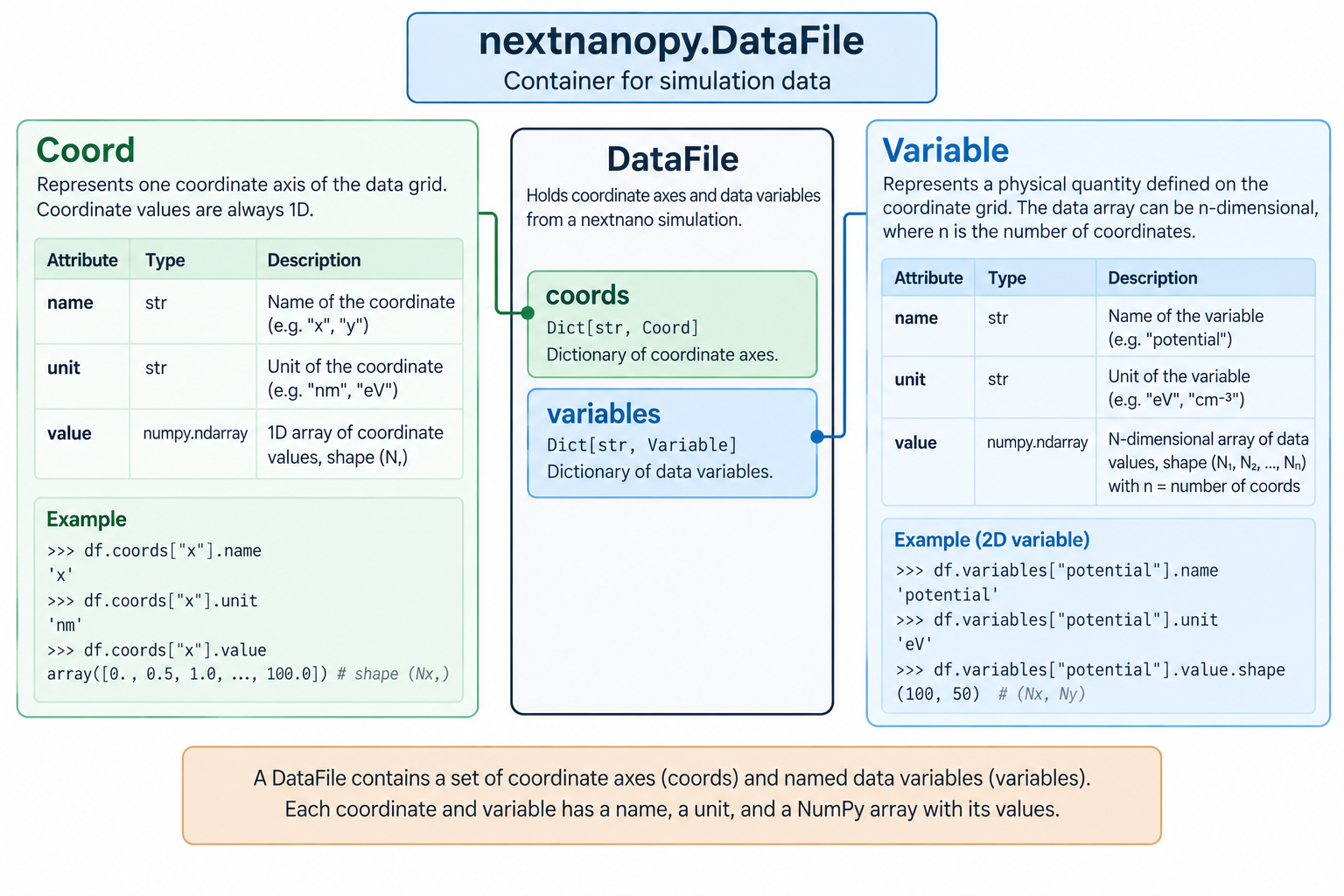
Figure 1 A DataFile holds the coordinate axes of the data grid in coords and
the physical quantities defined on them in variables. Each of them
carries a name, a unit and a NumPy array of values.#
It needs neither a nextnano license nor a configuration: reading output you already have is possible with nextnanopy alone. For the complete list of parameters, attributes, and methods, see DataFile.
Loading one file#
Point DataFile at a file and it picks the loader that fits, reads it, and
gives you the coordinates and the variables it found:
import nextnanopy as nn

df = nn.DataFile(r'...\bias_00000\bandedges.dat')

df.coords        # the axes the data is defined on, keyed by name
df.variables     # the quantities themselves, keyed by name
Both are looked up by name or by index, and indexing the file itself searches the two together:
x = df.coords['x']
gamma = df.variables['Gamma']

df['x']          # same as df.coords['x']
df['Gamma']      # same as df.variables['Gamma']
Both coordinates and variables are iterable.
Every coordinate and variable carries its name, its value as a NumPy
array and its unit:
for var in df.variables:
    print(var.name)
    print(var.value.shape)
    print(var.unit)
The loader is chosen from the file name, never from the contents: the extension
picks the format. Avoid renaming files that nextnano writes by default, as a renamed file can be read with the wrong
parser — or raises NotImplementedError if the new extension matches no loader.
Note
A .txt file is the one case where the product cannot be worked out
reliably, so name it:
df = nn.DataFile(r'...\variables_input.txt', product='nextnano++')
Working with the values#
In most cases the value array is what you are after: it is a plain
numpy.ndarray, so the whole of NumPy applies to it directly.
potential = df['potential'].value

print(f'maximum potential: {potential.max():.3f} {df["potential"].unit}')

potential.min(), potential.mean()   # and everything else NumPy offers
For more on working with arrays, see the NumPy user guide, or NumPy: the absolute basics for beginners if they are new to you.
Plotting#
plot() draws a quick preview with matplotlib. What it draws follows the number
of coordinates: with one, the variables are drawn against it; with two, each
variable becomes a colour mesh; with none, the first variable serves as the x
axis.
import matplotlib.pyplot as plt

df.plot(legend=True)
plt.show()
It returns the figure and the axes, so the preview is a starting point rather than a dead end:
fig, ax = df.plot()
ax.set_xlim(0, 50)
ax.set_title('Band edges')
Plotting needs matplotlib, which is an optional dependency — install it with
pip install nextnanopy[plot] if plot() raises ImportError. For
anything beyond a preview, take the arrays out and plot them yourself:
fig, ax = plt.subplots()

ax.plot(df['x'].value, df['Gamma'].value, label=df['Gamma'].label)
ax.set_xlabel(df['x'].label)
ax.legend()
Putting it together#
Run a simulation, then read and plot what it wrote:
from pathlib import Path

import matplotlib.pyplot as plt
import nextnanopy as nn

my_input = nn.InputFile(r'...\example.in')
my_input.execute()

df = nn.DataFile(Path(my_input.folder_output) / 'bias_00000' / 'bandedges.dat')
df.plot(legend=True)

plt.show()
See DataFile for the full reference, and Tutorial 2 in Tutorials for a worked example.